Cursor, connected to Robinhood

Run Guardrailed AI Trading Bots on Robinhood with Cursor.

Deploy Cursor agents on Robinhood’s Agentic Trading MCP with local, hard-coded risk hooks. The open-source core is MIT-licensed; the standalone Windows build is $25 once. No tool subscriptions.

Trade crypto, equities, and options! Utilize Robinhood Watchlists and more!

Required. Your own Cursor account and a funded Robinhood Agentic account. Neither is included with either edition.

  • Local Risk Hooks
  • Hard-Coded Circuit Breaker
  • Keys Stay in OS Keyring
  • Paper Trading First
  • No Tool Subscription
127.0.0.1:8765 LOCAL
Cursorhood dashboard showing several bots at once, each with its own asset class, portfolio, and scheduler.

Features

Local risk hooks before every order.

Prompts can fail under edge cases. The hook is code on your computer, and it runs before an order can reach Robinhood.

Hard-Coded Local Risk Hooks

Prompts can fail under edge cases, but hard code does not. Every order passes through local checks on your computer before touching the Robinhood API. Enforce strict caps on position sizing, daily max loss, contract limits, notional value, and time between orders. Uncertain setups automatically skip the trade.

Your Machine is the Trust Boundary

The process binds strictly to 127.0.0.1. API keys for Cursor, Massive, and your Robinhood session tokens remain inside your operating system’s native keyring. They are never stored in plaintext and never sent to a Cursorhood server. Cycles still call Cursor with your key, and allowed orders still go to Robinhood.

Specialists Across Any Model

Pair fast models like Composer or Auto for high-frequency price checks alongside heavier research models (Claude, GPT, Gemini) for reading SEC filings and market news. Trade crypto, equities, and options. Utilize a custom Robinhood watchlist, a default Robinhood list, specific symbols, or a saved scan. Run multiple bots at once, one asset class each. Options are single-leg.

Risk-Free Paper Trading First

Simulation mode is enabled by default. Test strategies using a local paper broker that simulates market, limit, stop, and stop-limit fills, tracking FIFO lots and realized P&L directly on your computer before toggling live trading.

Lean Context, Lower API Overhead

Research data (1H/1D charts, fundamentals, SEC filings, news) is isolated to a dedicated research view. Bots pull only essential indicators during active cycles, keeping context windows tight and minimizing Cursor API token costs.

On your machine

Cursorhood does not hold the account.

127.0.0.1

The process listens on loopback by default. Your computer is the trust boundary. There is no Cursorhood login in front of the console.

OS keyring

The Cursor API key, the optional Massive key, and the Robinhood token stay on your computer. Settings show a masked key. Secrets are not written to the local database, and they are not sent to a Cursorhood server.

Risk hook

Every order is checked on your computer before it can reach your Agentic account. Uncertain setups skip the trade.

Required

You bring Cursor and Robinhood.

Both accounts are required to run the Windows build or the MIT source. The $25 download does not include either one, and it does not store their keys.

Console

The same screen you run locally.

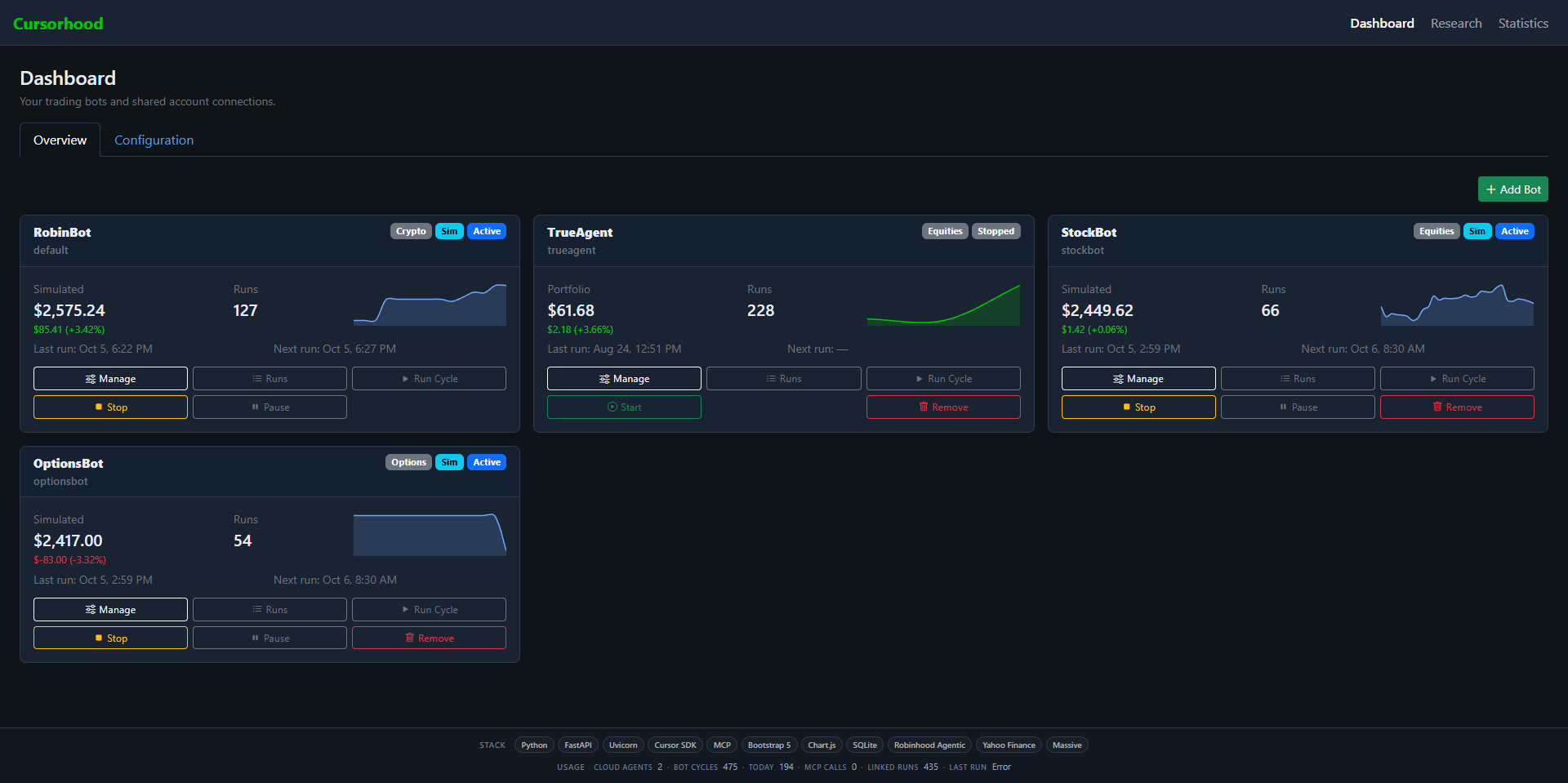
These captures are one local console. The four cards are an example fleet, not a limit. Simulation is on for the paper books. Those dollar amounts stay on your computer.

Dashboard · OverviewLOCAL
Fleet overview with RobinBot, TrueAgent, StockBot, and OptionsBot cards.

Add another bot

Each card is one bot: its own Cursor model, asset class, run count, sparkline, and scheduler. Add bot starts another from an equities, options, or crypto template. Crypto can keep cycling when the equity session is closed.

Dashboard · ConfigurationLOCAL
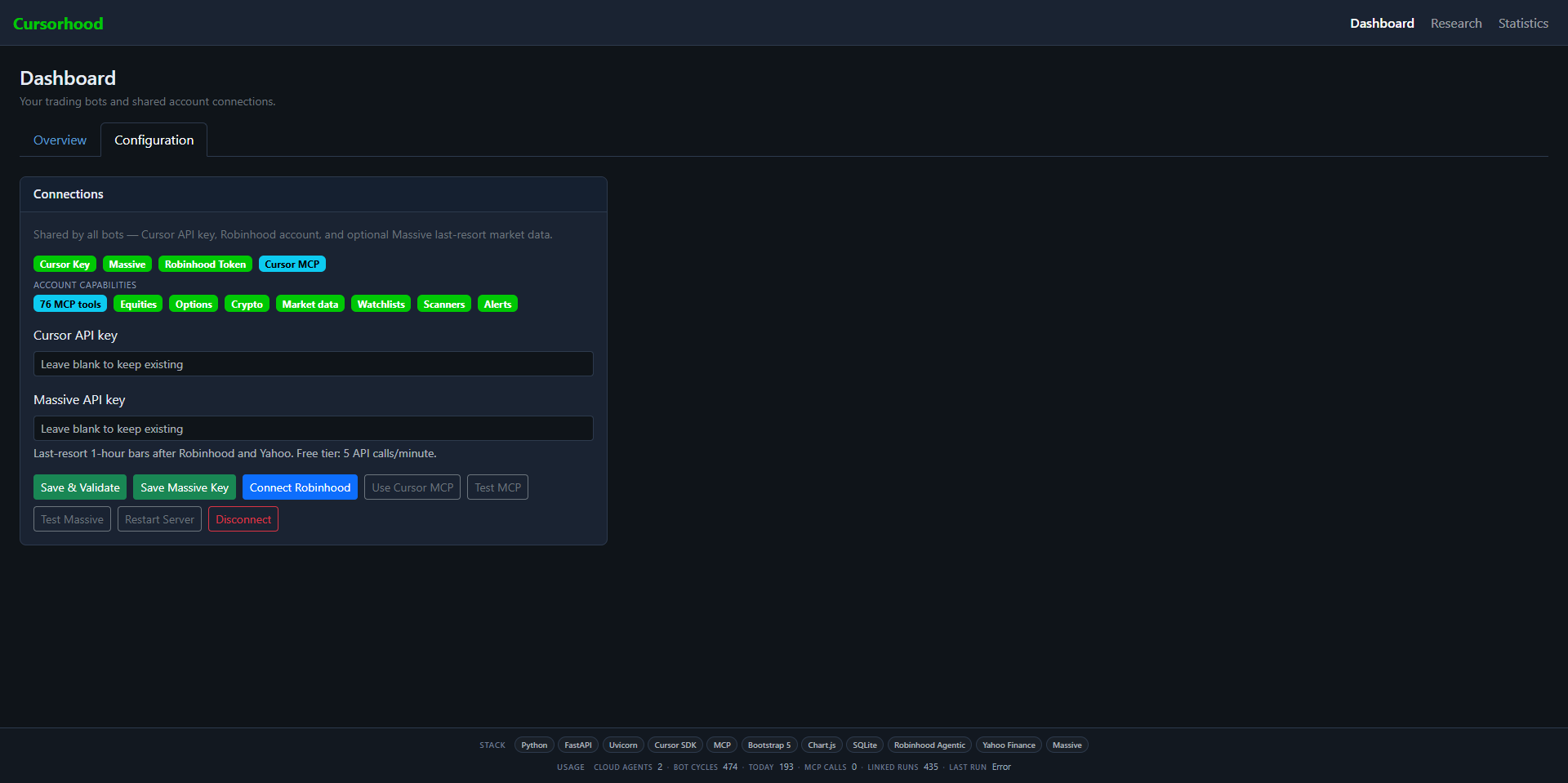
Configuration tab with connection status and key fields for Cursor, Massive, and Robinhood.

Keys stay in the keyring

Connections are shared by every bot. Leave a key field blank to keep the key already saved. The console stores Cursor and Massive keys in the OS keyring, not in a Cursorhood account.

RobinBot · CryptoLOCAL
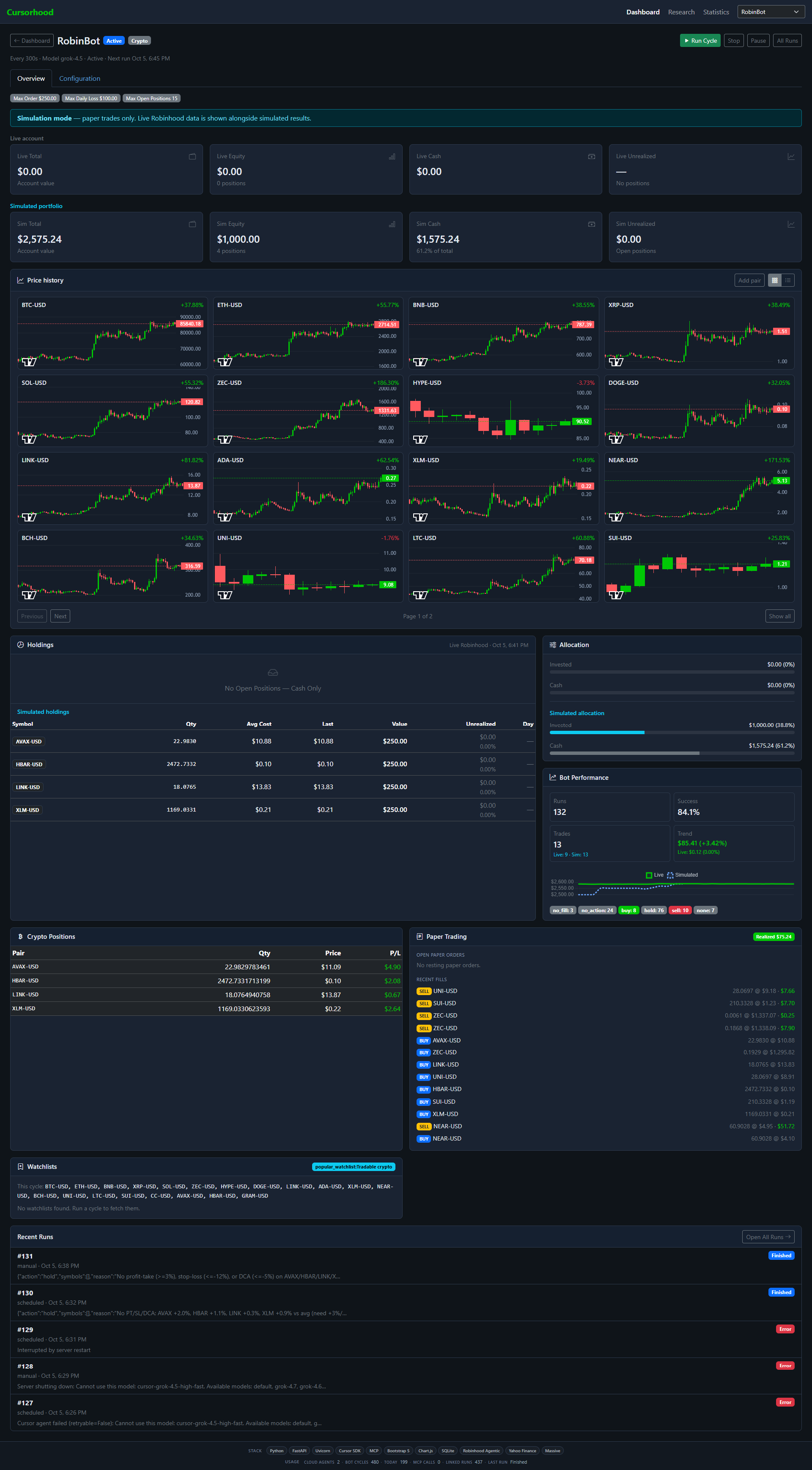
Crypto bot overview with a simulated portfolio, pair charts, and recent runs.

A paper crypto book

RobinBot scans pairs, charts them, and fills paper orders on your computer. The live Robinhood snapshot can sit beside the simulated book so you can compare them before you turn simulation off.

RobinBot · ConfigurationLOCAL
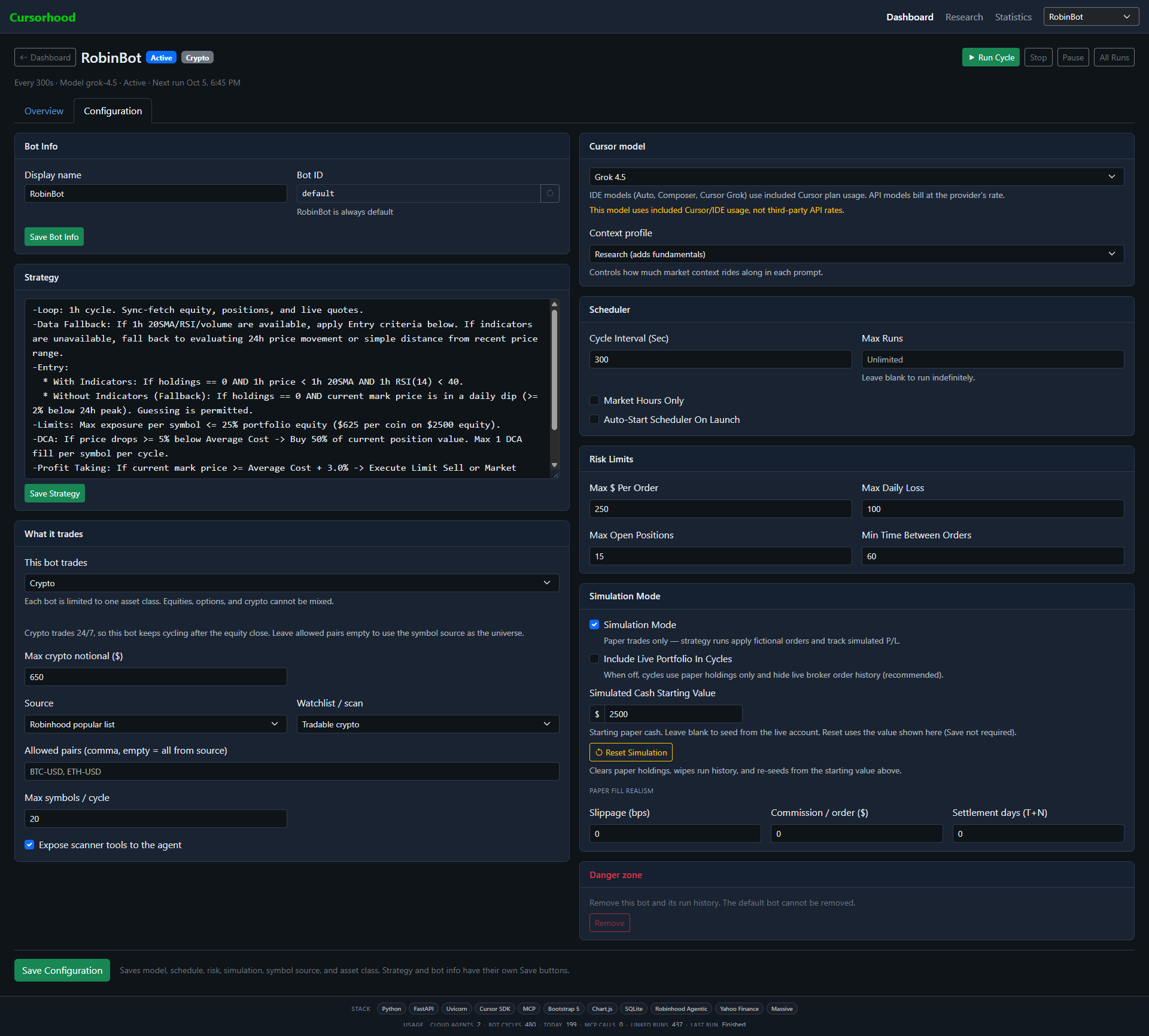
Crypto bot configuration with strategy text, model choice, interval, and simulation settings.

One class, one model

A bot trades equities, single-leg options, or crypto, not a mix. The strategy is markdown. The model is chosen on that bot from your Cursor catalog, so a fast Composer cycle and a heavier research model can run side by side.

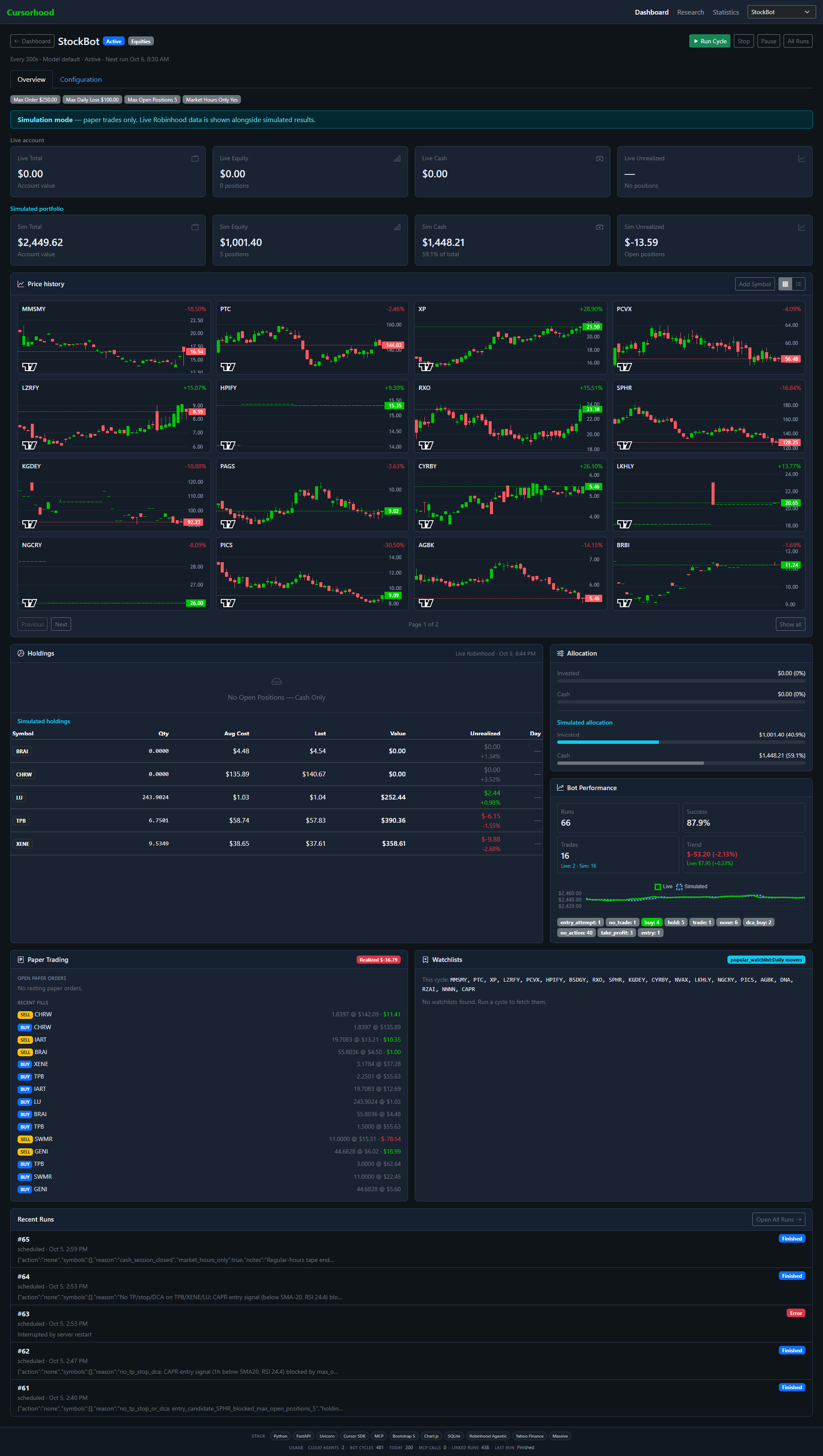
StockBot · EquitiesLOCAL
Equity bot overview with simulated holdings and daily mover charts.

Equities on a session clock

StockBot watches a resolved symbol list and keeps the paper share ledger locally: quantity, average cost, last price, and the day’s move.

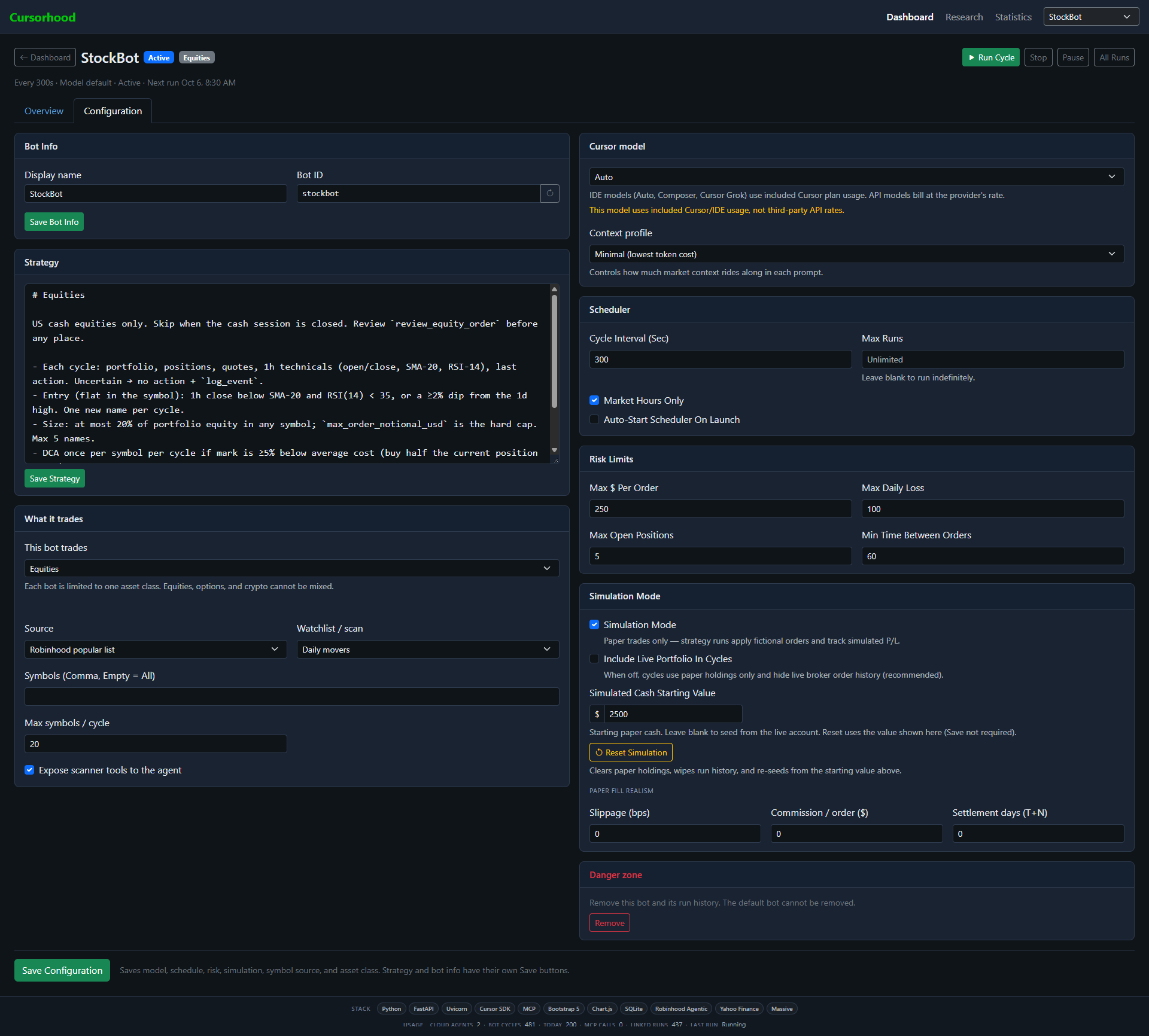
StockBot · ConfigurationLOCAL
Equity bot settings with market hours, the Auto model, and a Daily movers symbol source.

Market hours, then a cycle

The symbol source can be a custom watchlist, a default Robinhood list such as Daily movers, or specific tickers. More names mean a longer cycle. With market hours on, the scheduler waits out nights and weekends.

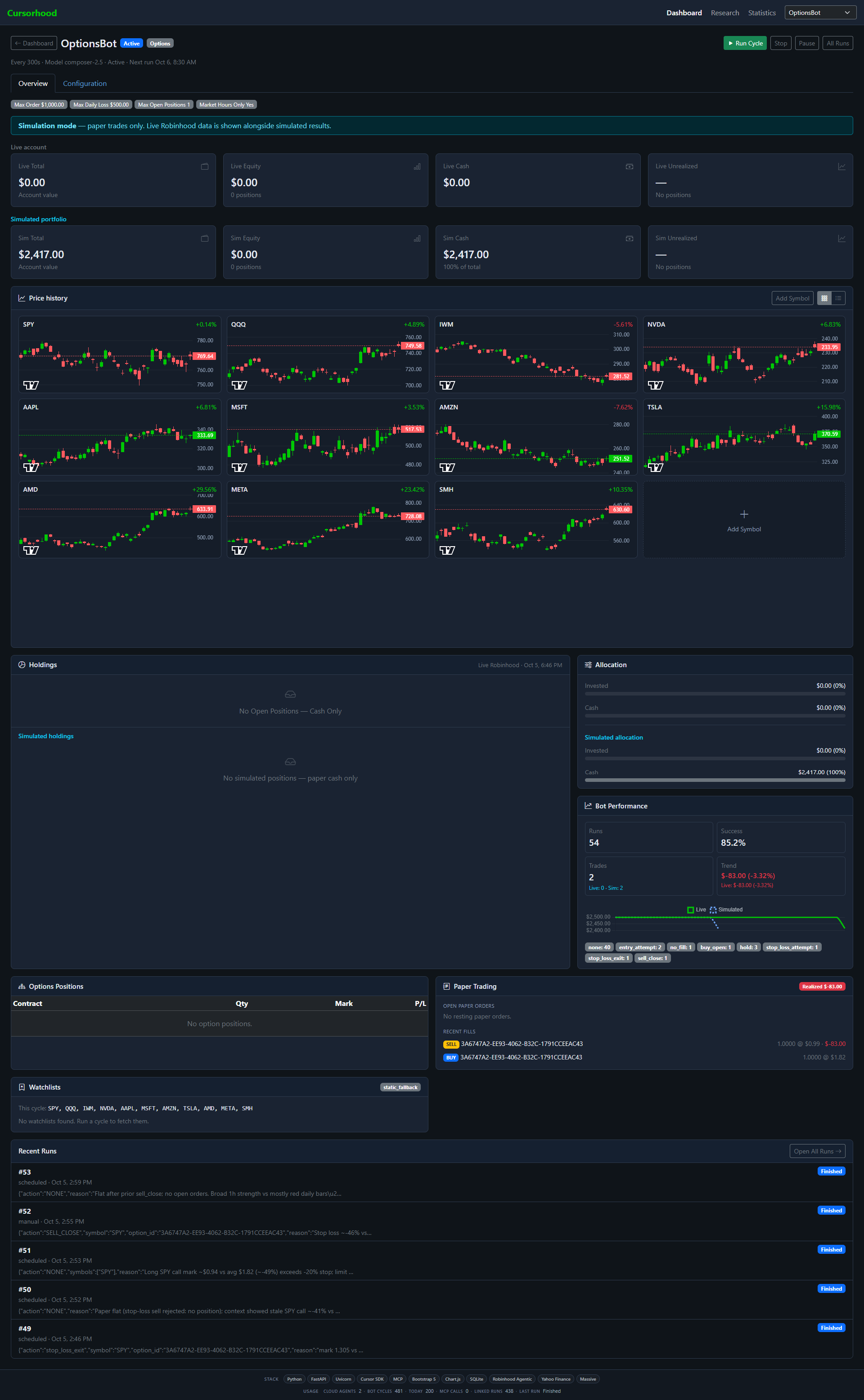
OptionsBot · OptionsLOCAL
Options bot overview with underlying charts and a paper options book.

Single-leg options

The charts are the underlyings. The agent uses those plus the option chain. Paper fills, open contracts, and realized premium stay in the local ledger.

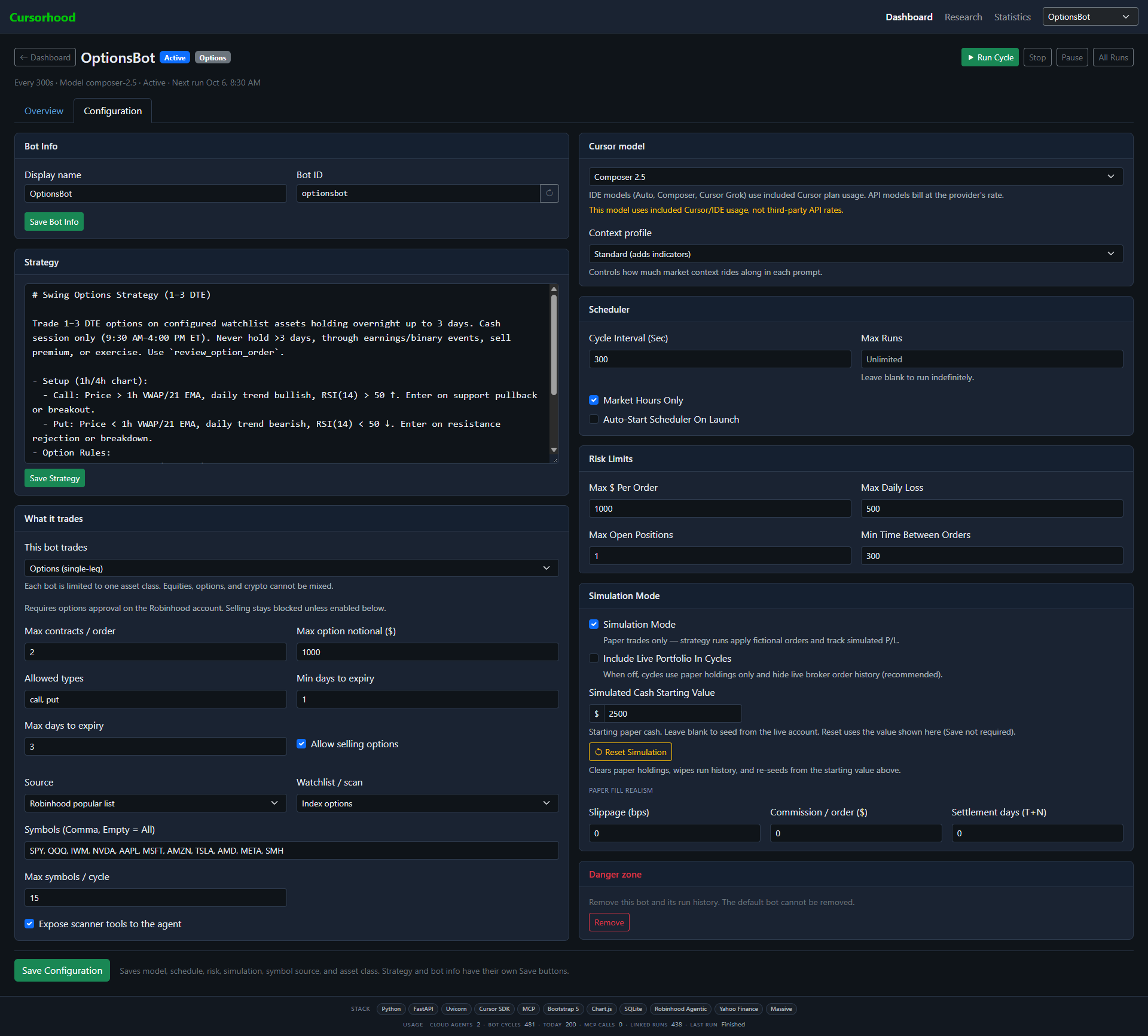
OptionsBot · ConfigurationLOCAL
Options bot settings with a short-dated strategy, Composer model, and contract limits.

Limits before the order

Contract count, notional, call or put, and a days-to-expiry window are enforced locally. Selling can stay off. The hook denies an exercise and tells the agent to close the contract instead.

Editions

Windows for the packaged app. MIT if you want the source.

There is no subscription to use this tool. Windows is $25 once. The MIT source is free. Cursor requires a subscription for API usage. Both run on your computer, and both still require your Cursor account and your Robinhood Agentic account. Neither edition includes those logins.

Windows

Paid

Beta · $25 once

  • Unzip Cursorhood-0.2.0-windows.zip and run Cursorhood.cmd.
  • Python 3.11 and the Cursor bridge are already in the folder. The launcher does not install packages.
  • The app still runs only on your PC. Keys stay in the OS keyring.
  • Later Windows builds ship on this line. Asking again for a purchased download does not charge you again.

After payment, Stripe opens the download page for this build. The license is personal and non-transferable.

MIT source

v0.2.0

Free · for reading and changing the console

The public repository is a separate project under the MIT license. You clone it, make a virtual environment, and install it. Same local rule: the process and the keys stay on your machine.

git clone https://github.com/Thinkmonger/Cursorhood.git
cd Cursorhood
git checkout v0.2.0
python -m venv .venv
.venv\Scripts\activate
pip install -e .
python -m runner.main
View Thinkmonger/Cursorhood

GitHub

The public source and the private Windows line.

Figures below are read from GitHub. The Windows repository stays private, so this page shows its release data and does not offer a clone.

Loading repository data…

Loading repository data…

FAQ

Before you run it.

What does Cursorhood actually do?

Cursorhood acts as a local orchestration bridge between Cursor and Robinhood. It turns Cursor agents into autonomous trading bots running on Robinhood’s Agentic Trading MCP, using the markdown strategies and risk parameters you specify.

How do local risk hooks protect my account?

System prompts alone cannot guarantee an LLM won’t make an errant trade during market volatility. Cursorhood injects a local deterministic check in Python before any tool call reaches Robinhood. If an order exceeds your daily max loss, position size, contract limit, or minimum trade interval, the local hook denies the execution locally.

Where are my API keys and session tokens stored?

On your local machine. Cursorhood listens strictly on 127.0.0.1. Credentials and API keys are saved directly into your OS keyring (Windows Credential Manager on the Windows build, and the OS keyring on other systems). They are never written to unencrypted database files or sent to a Cursorhood server. Cycles still call Cursor with your key, and allowed orders still go to Robinhood.

Will running multiple bots burn through my Cursor API budget?

Large context windows and tight polling loops can consume Cursor usage quickly. Cursorhood mitigates this by isolating heavy context (news, filings, full price tape) from standard execution cycles. You can also assign lightweight models (like Composer or Auto) to rapid scanning bots while reserving larger models for specialized analysis.

How does paper trading work, and how realistic is it?

Simulation mode is turned on by default. Cursorhood includes a local paper broker that processes limit, stop, stop-limit, and market orders, accounting for current bid/ask quotes and maintaining local FIFO accounting for realized P&L. You can compare paper performance side-by-side with live snapshots before switching simulation off.

What are the limitations or edge cases with options trading?

Cursorhood currently supports single-leg options strategies. The local risk hook enforces contract count caps, max notional exposure, and days-to-expiry (DTE) windows. Local rules automatically reject assignment/exercise attempts and prompt the agent to close open contract positions instead.

How does Cursorhood handle Robinhood API rate limits?

Robinhood’s Agentic Trading MCP spans 79 tools. To prevent rate-limiting when running multiple bots simultaneously, each bot is constrained to its own asset class (equities, options, or crypto) and tool subset, with configurable sleep cycles outside US market hours.

Are Cursor and Robinhood accounts included in the purchase?

No. You must provide your own active Cursor subscription/API key and a funded Robinhood account with Agentic Trading access enabled. Cursorhood provides the software runtime to connect them. Sign up from the Required section.

What is the difference between the $25 Windows Beta and the MIT Version?

MIT Source (Free). The open-source Python repository is for developers who want to inspect, audit, or customize the code. It requires Python 3.11+ and manual virtual environment setup.

Windows Beta ($25 once). A standalone, pre-packaged executable bundling Python 3.11, the Cursor bridge, and launch scripts (Cursorhood.cmd) for quick, double-click deployment without terminal setup. The Windows terms cover this download.

Is Cursorhood offering financial advice or managing funds?

No. Cursorhood is strictly an open-source/standalone software utility running locally on your computer. It does not provide financial advice, hosted signal feeds, or custodial services. You maintain complete control and liability over all trading strategies and API credentials.